Java 14 – Oracle trying to Revive Java with Astounding Features

Java has been one of the most popular programming languages in the world and has been consistently ranked at first position in the TIOBE index. Java always comes up with its special and exciting features with its new release.

Java has been already very popular language but the Oracle community never gives up on working on it to make it more popular and efficient so that users may not encounter any performance bugs or issues. So to make it more efficient and powerful, the Oracle has come up with Java 14 with more advanced features.

Java has celebrated its 24th anniversary in 2020 and till date there are 13 versions launched. And, the latest version Java 14 has been launched by Oracle Community on March 17, 2020. Oracle now offers every Java developer and enterprises to download it from its official website.

To get in-Depth knowledge on Java you can enroll for a live demo on Java Online Training

Being a Java lover, you must be excited to know about  the features of Java 14. Java 14 has been released with many significant Java Enhancement Proposals (JEPs). In this article, we have come up with an article to acquaint you with its latest features of Java 14.

Java 14 is supported by three main integrated development environments, including JetBrains IDEA, Apache NetBeans, and Eclipse IDE.

The 16 JEPs in JDK 14 include:

  1. Pattern Matching for instanceof (Preview)
  2. Packaging Tool (Incubator)
  3. NUMA-Aware Memory Allocation for G1
  4. JFR Event Streaming
  5. Non-Volatile Mapped Byte Buffers
  6. Helpful NullPointerExceptions
  7. Records (Preview)
  8. Switch Expressions (Standard)
  9. Deprecate the Solaris and SPARC Ports
  10. Remove the Concurrent Mark Sweep (CMS) Garbage Collector
  11. ZGC on macOS
  12. ZGC on Windows
  13. Deprecate the ParallelScavenge + SerialOld GC Combination
  14. Remove the Pack200 Tools and API
  15. Text Blocks (Second Preview)
  16. Foreign-Memory Access API (Incubator)

Features of Java 14

Pattern Matching for instanceof

We already know the use of instanceof operator which is used to check whether the given object matches the reference type or not. Pattern matching for instanceof operator allows for its efficient use and  decreases the necessity of type conversions in Java applications.

Helpful NullPointerExceptions

With Java 14 release, there are some improvements in NullPointer Exceptions in Java. The necessary information will be shown to the user by the JVM. For example, if there occurs an error which generates a null value, so the JVM should display the variable that results in zero value. This helps in easy catching and recovering the error.

Take your career to new heights of success with Java Training

Switch Expressions

Java 14 comes with an extended version of switch statement. If there are multiple cases that results to the same output then we write each case with a comma-separated values followed by a -> arrow to return a value.

Example:

switch(month)

case January, February, -> System.out.println(“Winter”);

case March, April, May, June ->  System.out.println(“Summer”);

case June, July, August ->  System.out.println(“Rainy”);

Packaging Tools

The Packaging tool feature of Java 14 provides a way to ease the process of application installation.The jpackage tool is used to bundle a Java application into a platform-specific package. Java 14 supports following platform-specific formats:

For Linux: deb and rpm

For MacOS: pkg and dmg

For Windows: msi and exe

To learn more about  great features of Java, you can enroll for a live demo on java online course

Records

Java 14 release came up with the  records as a preview feature. We can now compact the class declaration syntax with records. Users face a problem to write the repetitive codes; to remove this problem Java 14 has introduced the feature of records. For example:

Without records:

class Rectangle
{
    public final int length;
    public final int breadth;
    public Rectangle(int length, int breadth)
    {
        this.length = length;
        this.breadth=breadth;
    }
}

With Records:

NUMA-Aware Memory Allocation for G1

Numa (Non-Uniform Memory Access) is an architecture of sharing memory locally which eventually increases the performance of the system. But in NUMA memory architecture there is a small amount of memory stored in a processor. Java 14 proves to be a boon to us that provides an advanced feature to improve the performance of G1 Garbage collector on the large machines.

Non-Volatile Mapped Byte Buffers

We know that a Non-volatile memory is a memory area where there would not be any loss of data even after the power goes off. We also call such memory as persistent memory.

With the release of Java 14, there is an enhancement in MappedByteBuffer class that comes with an increased ability to gain access to non-volatile storage in the computer memory.

JFR Event Streaming

Java 14 now provides an API through which the data in the JFR ( Java Flight Recorder ) can continuously monitor the in-process and out-process applications. JFR is now available freely and has become the part of OpenJDK. is now part of the OpenJDK and therefore freely available.

The module jdk.jfr present in the package jdk.jfr.consumer enhances the ability to asynchronously subscribe to the events.

ZGC on macOS

ZGC (Z Garbage Collector) gets introduced with the Java 14 release that becomes an option for macOS users. Java 14 also provides the facility in which the Garbage collector releases the unused memory from the system.

ZGC on Windows

This feature is the same feature as the ZGC (Z Garbage Collector) for macOS, the only difference being that it provides the ZGC for Windows users. The goal is to use the feature of ZGC being platform-independent so that it can be used on any platform. But, there are some restrictions to use it with the older versions of Windows.

Deprecate the Solaris and SPARC Ports

According to this update, the Oracle Community wishes to get rid of the ports of outdated Operating systems like Solaris, Sparc etc. Java 14 has marked them deprecated so that they can be completely removed in the further updates of Java. Deprecating these ports, there will be a clear way to develop the new features to move the platform in the forward direction.

Remove the Concurrent Mark Sweep (CMS) Garbage Collector

As proposed by Thomas Schatzl, Java 14 aims to remove the CMS (Concurrent Mark Sweep) Garbage Collector from Java. This garbage collector was already marked as deprecated with Java 9. And, in Java 14, it has been completely removed. However, the update does not aim to remove the  CMS Garbage collector from the Java versions that completely rely on it.

Remove the Pack200 Tools and API

Java 14 officially proposes the Pack200 tools and API present in the java.util.jar package to be removed from Java. The Pack200 is a tool to compress the JAR (Java Archives) files. This API was already marked as obsolete from Java 11.

Text Blocks (Second Preview)

Java 14 introduces the second preview for the text blocks. The first preview came since Java 13. Text blocks are introduced so as to allow the programmers to easily create multi-line strings.

With the second preview of text blocks, there is an introduction to  2 new escape sequences which are: \<line-terminator> and \s. These escape sequences allow a fine-grained control over the processing of whitespaces and newlines.

Deprecate the ParallelScavenge + SerialOld GC Combination

With Java 14 there is a proposal to deprecate the combination of two garbage collectors :ParallelScavenge GC and SerialOld GC. This proposal is because there are a very few Java users who use this combination of Garbage Collectors. Moreover, this combination requires a considerable effort and cost to keep it updated and its of no use if they are not used by the majority of users. Therefore they have been marked as deprecated since Java14.

Foreign-Memory Access API (Incubator)

There are many libraries and applications  like Nettys ByteBuf API, mamchaced, mapDB, Ignite, etc that access the foriegn memory. There is no such API in Java to provide access to the foriegn memory. Therefore, with Java 14 there is a proposal to implement a suitable Java API that can help Java applications to easily access the foriegn memory.

Summary

In this article, we got familiar with the release of Java 14. It was released on March 17,2020 and came up with a number of updates and enhancements to ease the effort and performance of the Java applications and also deprecates many outdated features and plans to remove them with the further releases.
Angular Interpolation

What is Angular Interpolation?
Angular interpolation is used display a component property in the respective view template with double curly braces syntax. We can display all kind of properties data into view e.g. string, number, date, arrays, list or map.

Data binding consist of one way data binding and two way data binding. Interpolation is used for one way data binding. Interpolation moves data in one direction from our components to HTML elements.

To get in-Depth knowledge on Angularjs you can enroll for a live demo on Angularjs Online Training

Angular Interpolation Syntax
The property name to be displayed in the view template should enclosed in double curly braces also known as moustache syntax. i.e.

Interpolation Syntax

class AppComponent 
{
    propertyName: string;
    object: DomainObject;
}
 
{{ propertyName }}
 
{{ object.propertyName }}

Angular automatically pulls the value of the propertyName and object.propertyName from the component and inserts those values into the browser. Angular updates the display when these properties change.

Angular Interpolation Usages
Display simple properties – Interpolation can be used to display and evaluate strings into the text between HTML element tags and within attribute assignments.

Take your career to new heights of success with Angular Training

Display simple properties example

<h1>Greetings {{ name }}! </h1>
 
<h4><img src="{{ backgroundImgUrl }}" style="height:40px"></h4>

Evaluate arithmetic expressions – Another usage of interpolation is to evaluate arithmetic expressions present within the curly braces.

Arithmetic expressions example

<h6>{{3 + 5}}</h6>   //outputs 8 on HTML browser

Invoke methods and display return values – We can also invoke/call methods on hosting component views within interpolation expressions.

greet.component.ts

import { Component, OnInit } from '@angular/core';
 
@Component({
selector: 'app-greet',
template: `
    <h1>Greetings {{ name }}! </h1>
    <h2>Have a good {{ getTime() }}!</h2>
`,
styleUrls: ['./greet.component.css']
})
export class GreetComponent implements OnInit {
 
name: string = "John Doe";
 
getTime(): string {
    return 'morning';
}
 
}

Display array items – We can use interpolation along with ngFor directive to display an array of items.

DomainObject.ts

export class DomainObject 
{
  constructor(public id: number, public name: string) {
    //code
  }
}

app.component.ts

import { DomainObject } from './domain';
  
@Component({
  selector: 'app-root',
  template: `
  <h1>{{title}}</h1>
  <h2>The name is : {{domainObjectItem.name}}</h2>
  <p>Data Items:</p>
  <ul>
    <li *ngFor="let d of domainObjects">
      {{ d.name }}
      </li>
  </ul>
`
})
export class AppComponent 
{
  title = 'App Title';
 
  domainObjects = [
    new DomainObject(1, 'A'),
    new DomainObject(2, 'B'),
    new DomainObject(3, 'C'),
    new DomainObject(4, 'D')
  ];
 
  domainObjectItem = this.domainObjects[0];
}

Either we use inline template or separate HTML file for component view, the template data bindings have the same access to the component’s properties.

Angular Interpolation Example

Let’s create a new component using @angular/cli by following command.

Create angular template

//with inline template using '-it' flag
 
ng generate component greet -it

Above command will generate ‘greet.component.ts‘ with inline template. Let’s add properties name and time to the greet component like shown below:

greet.component.ts

import { Component, OnInit } from '@angular/core';
 
@Component({
selector: 'app-greet',
template: `
<h1>Greetings {{name}}! </h1>
<h2>Have a good {{time}}!</h2>
`,
styleUrls: ['./greet.component.css']
})
export class GreetComponent implements OnInit {
 
name: string = "John Doe";
time: string = "morning";
 
}

Angular automatically pulls the value of the name and time properties from the ‘greet’ component and inserts those values into the browser. Angular updates the display when these properties change.

Difference between Interpolation and Property Binding

Interpolation is a special syntax that Angular converts into property binding (pair of square bracket). It’s a convenient alternative to property binding.

Another major difference is that to set an element property to a non-string data value, we must use property binding.

In this example, OK button will be disabled or enabled based on the value of 'isDisabled'. on the other side, Cancel button will always be disabled irrespective of the property value.

Property binding example – works

export class AppComponent {
    isDisabled: boolean = true;
}
 
<button [disabled]='isDisabled'>OK</button>             //Data binding
 
<button disabled='{{isDisabled}}'>Cancel</button>       //Interpolation

To get in-Depth knowledge on Angular Interpolation you can enroll for a live demo on Angular Online Training

How to Use Change Detection in Angular

Change Detection means updating the DOM whenever data is changed. Angular provides two strategies for Change Detection.

In its default strategy, whenever any data is mutated or changed, Angular will run the change detector to update the DOM. In the onPush strategy, Angular will only run the change detector  when a new reference is passed to @Input() data.

To update the DOM with updated data, Angular provides its own change detector to each component, which is responsible for detecting change and updating the DOM.

To get in-Depth knowledge on Angularjs you can enroll for a live demo on Angular Online Training

Let’s say we have a MessageComponent, as listed below:

import { Component, Input } from '@angular/core';
@Component({
  selector: 'app-message',
  template: `
    <h2>
    Hey {{person.firstname}} {{person.lastname}} ! 
    </h2>
    `
})
export class MessageComponent {
  @Input() person;
}

In addition, we are using MessageComponent inside AppComponent as shown below:

import { Component, OnInit } from '@angular/core';
@Component({
    selector: 'app-root',
    template: `
  <app-message [person]='p'></app-message>
  <button (click)='changeName()'>Change Name</button>
  `
})
export class AppComponent implements OnInit {
    p: any;
    ngOnInit(): void {
        this.p = {
            firstname: 'Brad',
            lastname: 'Cooper'
        };
    }
}

Let us talk through the code: all we are doing is using MessageComponent as a child inside AppComponent and setting the value of person using the property binding. At this point in running the application, you will get the name printed as output.

Take your career to new heights of success with Angular Training

Next, let’s go ahead and update the  firstname property on the button click in the AppComponent class below:

changeName() {
    this.p.firstname = 'Foo';
}

As soon as we changed the property of mutable object P, Angular fires the change detector to make sure that the DOM (or view) is in sync with the model (in this case, object p). For each property changes, Angular change detector will traverse the component tree and update the DOM.

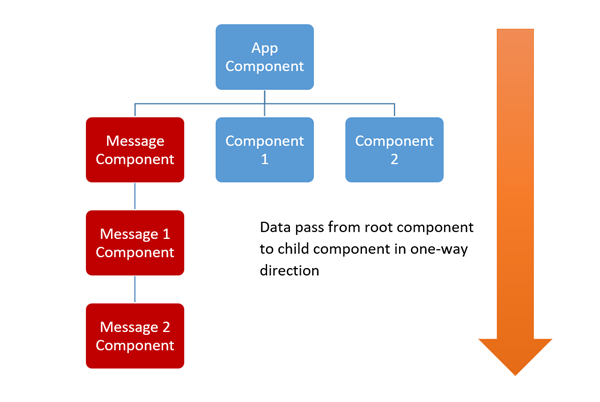
Let’s start with understanding the component tree. An Angular application can be seen as a component tree. It starts with a root component and then goes through to the child components. In Angular, data flows from top to bottom in the component tree.

Whenever the @Input type property will be changed, the Angular change detector will start form the root component and traverse all child components to update the DOM. Any changes in the primitive type’s property will cause Angular change detection to detect the change and update the DOM.

In the above code snippet, you will find that on click of the button, the first name in the model will be changed. Then, change detection will be fired to traverse from root to bottom to update the view in MessageComponent.

There could be various reasons for Angular change detector to come into action and start traversing the component tree. They are:

  1. Events fired such as button click, etc.
  2. AJAX call or XHR requests.
  3. Use of JavaScript timer functions such as setTimeOut , SetInterval.

Now, as you see, a single property change can cause change detector to traverse through the whole component tree. Traversing and change detection is a heavy process, which may cause performance degradation of application. Imagine that there are thousands of components in the tree and mutation of any data property can cause change detector to traverse all thousand components to update the DOM. To avoid this, there could be a scenario when you may want to instruct Angular that when change detector should run for a component and its subtree, you can instruct a component’s change detector to run only when object references changes instead of mutation of any property by choosing the onPushChangeDetection strategy.

You may wish to instruct Angular to run change detection on components and their sub-tree only when new references are passed to them versus when data is simply mutated by setting change detection strategy to onPush.

Let us go back to our example where we are passing an object to MessageComponent. In the last example, we just changed the firstname property and that causes change detector to run and to update the view of MessageComponent. However, now we want change detector to only run when the reference of the passed object is changed instead of just a property value. To do that, let us modify MessageComponent to use the OnPush ChangeDetection strategy. To do this set the changeDetection property of the @Component decorator to ChangeDetectionStrategy.OnPush as shown in listing below:

import { Component, Input, ChangeDetectionStrategy } from '@angular/core';
@Component({
    selector: 'app-message',
    changeDetection: ChangeDetectionStrategy.OnPush,
    template: `
    <h2>
    Hey {{person.firstname}} {{person.lastname}} !
    </h2>
    `
})
export class MessageComponent {
    @Input() person;
}

At this point when you run the application, on the click event of the button in the AppComponent change detector will not run for MessageComponent, as only a property is being changed and reference is not changing. Since the change detection strategy is set to onPush, now the change detector will only run when the reference of the @Input property is changed.

changeName() {
    this.p = {
        firstname: 'Foo',
        lastname: 'Kooper'
    };
}

In the above code snippet, we are changing the reference of the object instead of just mutating just one property. Now when you run the application, you will find on the click of the button that the DOM is being updated with the new value.

By using onPush Change Detection, Angular will only check the tree if the reference passed to the component is changed instead of some property changed in the object. We can summarize that, and use an Immutable Object with onPush Change Detection to improve performance and run the change detector for the component tree when the object reference is changed.

We can further improve performance by using RxJS Observables because they emit new values without changing the reference of the object. We can subscribe to the observable for new value and then manually run ChangeDetector.

Let us modify AppComponent to pass an observable to MessageComponent.

import { Component, OnInit } from '@angular/core';
import { BehaviorSubject } from 'rxjs/BehaviorSubject';
@Component({
    selector: 'app-root',
    template: `
  <app-message [person]='data'></app-message>
  <button (click)='changeName()'>Change Name</button>
  `
})
export class AppComponent implements OnInit {
    p: any;
    data: any;
    ngOnInit(): void {
        this.p = {
            firstname: 'Brad',
            lastname: 'Cooper'
        };
        this.data = new BehaviorSubject(this.p);
    }
    changeName() {
        this.p = {
            firstname: 'Foo',
            lastname: 'Kooper'
        };
        this.data.next(this.p);
    }
}

In the code, we are using BehaviorSubject to emit the next value as an observable to the MessageComponent. We have imported BehaviorSubject from RxJS and wrapped object p inside it to create an observable. On the click event of the button, it’s fetching the next value in the observable stream and passing to MessageComponent.

In the MessageComponent, we have to subscribe to the person to read the data.

@Input() person: Observable<any>;
_data;
ngOnInit(){
    this.person.subscribe(data => {
        this._data = data;
    });
}

Now, on the click of the button, a new value is being created, however, a new reference is not being created as the object is an observable object. Since a new reference is not created, due to onPush ChangeStrategy, Angular is not doing change detection. In this scenario, to update the DOM with the new value of the observable, we have to manually call the change detector as shown below:

export class MessageComponent implements OnInit {
    @Input() person: Observable<any>;
    _data;
    constructor(private cd: ChangeDetectorRef) { }
    ngOnInit() {
        this.person.subscribe(data => {
            this._data = data;
            this.cd.markForCheck();
        });
    }
}

We have imported the ChangeDetectorRef service and injected it, and then called markForCheck() manually to cause change detector to run each time observable emits a new value. Now when you run application, and click on the button, the observable will emit a new value and the change detector will update the DOM also, even though a new reference is not getting created.

To summarize:

  1. j .,mIf Angular ChangeDetector is set to default then for any change in any model property, Angular will run change detection traversing the component tree to update the DOM.
  2. If Angular ChangeDetetor is set to onPush then Angular will run change detector only when new reference is being passed to the component.
  3. If observable is passed to the onPush change detector strategy enabled component then Angular ChangeDetctor has to be called manually to update the DOM.

Transforming Responses Using the Map Operator in Angular

Introduction

 The map operator, basically, helps us to transform data using an observer. A map operator is a function that builds on the observable’s foundation to enable sophisticated manipulation of collection.

Syntax of Map Operator

The map operator applies a given project function to each value emitted by the source Observable and emits the resulting values as an observable.

To get in-Depth knowledge on Angularjs you can enroll for a live demo on Angularjs Online Training

Syntax

map<T, R>(project: (value: T, index: number) => R, thisArg?: any): OperatorFunction<T, R>

The “project” is a function to apply to each value emitted by the source observable. The index parameter is the number “i” for the “i”-th emission that has happened since the subscription, starting from the number 0. The “thisArg” is an optional argument to define what the index parameter is in the project function. The default value is undefined. The map operator returns an observable, OperatorFunction<T, R>, that emits the values from the source observable transformed by the given project function. Similar to the well-known Array.prototype.map function, this operator applies a projection to each value and emits that projection in the output observable. Let’s look at an example below where we are using a map operator. On every click on the view, we are capturing the position clientX event and logging it using the console log.

Take your career to new heights of success with Angular Training


import { fromEvent } from 'rxjs';
import { map } from 'rxjs/operators';

const clicks = fromEvent(document, 'click');
const positions = clicks.pipe(map(ev => ev.clientX));
positions.subscribe(x => console.log(x));
``

Using Map Operator in Angular

The map operator takes configuration options, and they return a function that takes a source observable. When executing the return function, the operator observes the source observables emitted values, transforms those values, and returns a new observable of those transformed values. Let’s take a look at an example below.

import {map} from 'raj’s/operators';

const nums = of (1, 2, 3);

const mulValues = map ((val: number) => val * 2);
const mulNums = mulValues (nums);

mulNums.subscribe(x => console.log(x));

// Outputs
// 1
// 4
// 6

In the above example, we are importing the map operator from the operator’s library of RxJS. By using the map operator, we are transforming values to values multiplied by two.

Using the Map Operator with the Pipe Function

We can use pipes to link operators together. Pipes let you combine multiple functions into a single function. The pipe() function takes the functions you want to combine as it’s arguments and returns a new function that, when executed, runs the composed functions in sequence. A set of operators applied to an observable is a recipe. A recipe is a set of instructions for producing the values you are interested in. By itself, the recipe doesn’t do anything. You need to call subscribe() to produce a result through the recipe.

In the below example, let’s look at how both the filter and map operators are used to transform the data using the pipe. First, we will check if the values are even and then we’ll multiply those values by two.

To learn more about Transforming Responses Using the Map Operator in Angular and other great features of AngularJS , you can enroll for a live demo on Angular Online Training

import {filter, map} from 'raj’s/operators';

const nums = of (1, 2, 3, 4, 5);

// Let’s create a function that accepts an Observable.
const melaenas = pipe (
filter ((n: number) => n % 2 === 0),
map (n => n * 2)
);

// Let’s create an Observable that will run the filter and map functions
const uneven = mulEvenVals(nums);

// Subscribe to run the combined functions
mulEven.subscribe(x => console.log(x));


There is a shorter way to use the pipe function. In the below example, we will explore how we can use the map operator and filter operator using the short form of the pipe() function.

import {filter, map} from 'raj’s/operators';

const uneven = of (1, 2, 3, 4, 5)
. pipe (
filter (n => n % 2 === 0),
map (n => n * 2)
);

// Subscribe to get values
mulEven.subscribe(x => console.log(x));

Multiple Map Operators

Now that we understand a little bit about the map operator and pipe functions, let’s now try some complicated examples using multiple map operators.

Const myData = of(‘Hello’).pipe(
map(x => {
return ‘${x} world’;
} ),
map(x => ‘${x} of’),
map(x => ‘${x} Angular’)
);

The output will be ‘Hello world of Angular’. Here, the pipe function will use the reduce function internally. In the reduced code, we can see the string being built up as it passes through each one of the map operators. Eventually, it will produce the string, ‘Hello world of Angular’. The input variable is still the observable returned from of(‘Hello’). With an understanding of how data flows through a single operator, it’s not hard to extend that understanding to multiple operators.

Summary

In this guide, we have learned that operators, like the map and filter, are functions that take in and return observables.

  • Each operator exposes a public function, like a map or filter, which we will import from the ‘rxjs/operators’ library and pass it into the pipe.
  • Each operator has an operator class which implements the operator interface so that it can subscribe to other observables.
  • Each operator has a subscriber class which contains the logic for that operator (invocation of the projection function for the map, the invocation of the predicate function for the filter, etc.).

We’ve also seen how the pipe is used to compose operators together. Internally, it’s taking the values emitted by the source observable, and reducing it over the list of operators.

what is NgZone in Angular

suppose we want to create our first great web framework Ares (written in typescript).we have components in our library and the first thing we are trying to solve is sync state from component to view and vice versa. here’s how our library source looks like.

class Ares {
  comps: any[] = [];

  addComp(comp: any) {
    this.comps.push(comp);
  }
  
  
  renderUi() {
    let htmlToRender = "";

    this.comps.forEach(c => (htmlToRender += c.render()));

    document.querySelector("body").innerHTML = htmlToRender;
  }
}

var ares = new Ares();

export default ares;

so our Ares has components and it has a magic function “renderUi()”, which internally calls components render function, combines HTML and sets them to the body (worst way to implement sync 🙂 ). okay, so far so good, let’s add a simple component to our application.

To get in-Depth knowledge on Angularjs you can enroll for a live demo on Angular Online Training

export class Root {
  seconds = 0;

  constructor() {
   
  }

  render() {
    return `<div> ${this.seconds} </div>`;
  }
}

and we have our “main.ts” file, where an application is started;

import { Root } from "./root";
import ares from "./ares";
let ro1 = new Root();
ares.addComp(ro1);
ares.renderUi();

here we just create component, adding to ares instance and call renderUi() method to sync state. so everytime something has changed inside component we have to call renderUi() method;

Take your career to new heights of success with Angularjs online course

import ares from "./ares";

export class Root {
  seconds = 0;

  constructor() {
    this.fakeAsyncRequest();
  }
  
  //fake request that set's seconds to 50
  // we call renderUi(); method to update changes;
  private fakeAsyncRequest() {
    setTimeout(() => {
      this.seconds = 50;
      ares.renderUi();
    }, 3000);
  }

  render() {
    return `<div> ${this.seconds} </div>`;
  }
}

as it turns out whenever our framework consumer want’s to update state from component to view, he has to call renderUi() method. we don’t like that, we want our consumers to be happy and don’t worry about some internal stuff, so how can we call renderUi method whenever something changes. let’s think about a bit when does anything changes to a web application regardless of scale or size of it?. there are only 4 ways to make this happen

  • Ajax request
  • user events (click,focus,blur…)
  • setTimeout
  • setInterval

if none of this happened, then there is no way that any state has been changed. so if we somehow get notified that some of that operation has been completed then we can call our magic function and update state from component to view.

for the first glance, it’s really hard to figure out how can we be notified that’s something has happened, because browsers don’t have such kind of API.what browsers have is you can override almost every method or variable in browsers API. so what if we write something like that

To learn more about NgZone in Angular and other great features of AngularJS , you can enroll for a live demo on Angularjs Online Training

class Ares {
  comps: any[] = [];

  addComp(comp: any) {
    this.comps.push(comp);
  }

  renderUi() {
    let htmlToRender = "";

    this.comps.forEach(c => (htmlToRender += c.render()));

    document.querySelector("body").innerHTML = htmlToRender;
  }
}

var ares = new Ares();

//we overite setInterval method
let oldTimeout = window.setTimeout;

window.setTimeout = (handler,time) => {
  let rewritedHandler = () => {
    handler();
    ares.renderUi();
  };
  return oldTimeout(rewritedHandler,time);
};

export default ares;

we are overriding default setTiemout method, here’s what’s gonna happen, whenever someone calls setTimeout it will go to our cuatom setTimeout method, that calls our rewritedHandler method and internally calls passed handler function, and that’s the place where we will be notified whenever setTimeout fires and call renderUi() method, so if we remove renderUi() method, from root component inside setTimeout, the data will be synced anyway. really cool right?!, we can override also user events, setInterval ajax requests, and get notified whenever something happens. and that’s what is the amazing Zone.js library used for, Angular uses internally to detect that something happened inside an application, that’s why you don’t have to call some Angular’s internal function to update state ( like React setState method).

Zone.js does it the same way as we did here (of course muuuuch more sophisticated way, and adds much more features on it ).

NgZone is just wrapper class around zone, so you can use it inside in Angular. so whenever you have some async operation that you don’t want to trigger change detection, you can call it inside runOutsideAngular, of ngZone class and job is done, in the opposite if there’s some third party library, that doesn’t trigger change detection for example “TweenMax”, you can call any of it’s method inside NgZone’s run method, and it will triger change detection.

AngularJS Forms Data Binding Tutorial with Example

What Is Form in AngularJS?

The Form in angularjs is a collection of controls and it will allow users to enter data. In angularjs form will provide data binding and validation of input controls.

Following are the form input controls which will allow users to enter data.

                                       – Input controls

                                       – Select controls

                                       – Textarea controls

In angularjs data binding to input controls can be done by using ng-model directive. The ng-model directive in angularjs is used to bind and get data from input controls and it will provide two way data binding by synchronizing data between model to view and vice versa (view to model).

To get in-Depth knowledge on Angularjs you can enroll for a live demo on Angularjs Online Training

Syntax of AngularJS Data Binding to Input Controls

Following is the syntax of using angularjs ng-model directive to bind data to input controls in form.

<script type="text/javascript">

var app = angular.module('formApp', []);

app.controller('formCtrl', function ($scope) {

$scope.fname = "Welcome to ";

$scope.lname = "OnlineITGuru";

});

</script>

 <div ng-app="formApp" ng-controller="formCtrl">

First Name:<input type="text" ng-model="fname" /><br /><br />

Last Name:<input type="text" ng-model="lname" />

</div>

If you observe above syntax we defined ng-model directive in html input controls and using same ng-model values in controller to bind values to input controls.

Take your career to new heights of success with Angular Training

Example of AngularJS Data Binding to Input Controls

Following is the example of binding data to input controls using ng-model directive in angularjs.

<!DOCTYPE html>

<html>

<head>

<title>

AngularJs Data Binding to Controls in Form

</title>

<script src="http://ajax.googleapis.com/ajax/libs/angularjs/1.4.8/angular.min.js"></script>

<script type="text/javascript">

var app = angular.module('formApp', []);

app.controller('formCtrl', function ($scope) {

$scope.fname = "Welcome to ";

$scope.lname = "OnlineITGuru";

});

</script>

</head>

<body>

<div ng-app="formApp" ng-controller="formCtrl">

First Name:<input type="text" ng-model="fname" /><br /><br />

Last Name:<input type="text" ng-model="lname" />

<p>Full Name: {{fname +" "+ lname}}</p>

</div>

</body>

</html>

AngularJS Forms Data Binding Example

Following is the example of binding data to input field controls in form element in angularjs applications.

<!DOCTYPE html>

<html>

<head>

<title>

AngularJs Data Binding to Controls in Form

</title>

<script src="http://ajax.googleapis.com/ajax/libs/angularjs/1.4.8/angular.min.js"></script>

<script type="text/javascript">

var app = angular.module('formApp', []);

app.controller('formCtrl', function ($scope) {

$scope.fname = "Welcome to ";

$scope.lname = "OnlineITGuru";

$scope.getvalues = function () {

$scope.name = $scope.fname + " " + $scope.lname;

}

});

</script>

</head>

<body>

<div ng-app="formApp" ng-controller="formCtrl">

<form novalidate>

First Name:<input type="text" ng-model="fname" /><br /><br />

Last Name:<input type="text" ng-model="lname" /><br /><br />

<input type="button" value="Get Values" ng-click="getvalues()" />

<p>Full Name: {{name}}</p>

</form>

</div>

</body>

</html>

If you observe above code we defined novalidate property to form. It will disable all default validations in form and allow ng-model attribute to bind data to input controls. 

For first name and last name input control values will be set from controller and by clicking on button we can get controls values. Now we will run and see the output of example.

Constructor in Java

Constructor in Java is an object builder or a block of code which creates an object. It is very similar to a Java method the main difference is that it does not have a return type, not even void. It is often referred to as a method. Constructor invoked automatically when an object is created.

Note – When an object is created at least one constructor is called. If there is no constructor then the default constructor is called.

Rules for Writing Constructors

These are some rules for writing constructors in Java:

  • The name of the constructor must be the same as the class name.
  • A constructor must have no return type not even void.
  • In constructor access modifiers are used to control its access so that other classes can call the constructor.
  • A constructor cannot be final, abstract, abstract and synchronized.

To get in-Depth knowledge on Java you can enroll for a live demo on Java Online Training

Types of Constructor in Java

Following are the two types of constructors, let’s discuss them with examples:

1. Default Constructor

A constructor that has no parameter is called as a default constructor. If we do not implement any constructor in our program then Java compiler automatically creates a constructor.

Example-

package com.OnlineITGuru.constructor;
class OnlineITGuru
{
  int number;
  String name;
  OnlineITGuru()
  {
    System.out.println("Default Constructor called");
  }
}
public class DefaultConstructor
{
  public static void main(String[] args)
  {
    OnlineITGuru objectName = new OnlineITGuru();
    System.out.println(objectName.name);
    System.out.println(objectName.number);
  }
}

2. Parameterized Constructor

A constructor that has parameters is called a parameterized constructor. It is mainly used to provide different values to distinct objects. Although you can use the same values too.

Take your career to new heights of success with Java certification course

Example-

package com.OnlineITGuru.constructor;
class OnlineITGuru
{
  String employeeName;
  int employeeId;
  OnlineITGuru(String employeeName, int employeeId)
  {
    this.employeeName = employeeName;
    this.employeeId = employeeId;
  }
}
public class ParameterizedConstructor {
  public static void main (String[] args)
  {
    OnlineITGuru employeeObject = new OnlineITGuru("Renuka", 20);
    System.out.println("OnlineITGuru Name " + employeeObject.employeeName +
        " and OnlineITGuru Id :" + employeeObject.employeeId);
  }
}

Java Constructor Chaining

When we call a constructor from another constructor of the same class then the procedure is known as constructor chaining in Java. The main purpose of constructor chaining is that you can pass parameters through different constructors, but the initialization is done at the same place. If two different constructors require the same parameter then unnecessary we need to initialize that parameter twice.

Constructor Overloading in Java

Overloading is basically having multiple instances of the same thing. Constructor Overloading in java simply means that having more than one constructor but with different parameter lists. So that the multiple constructors perform different tasks. Like methods, we can overload constructors.

To learn more about Constructors in Java and other great features of Java, you can enroll for a live demo on Java Training

Example –

package com.OnlineITGuru.constructor;
class OnlineITGuru
{
  OnlineITGuru(String name)
  {
    System.out.println("Constructor with one " +
        "argument - String : " + name);
  }
  OnlineITGuru(String name, int age)
  {
    System.out.print("Constructor with two arguments - String and Integer : " + name + " "+ age);
  } 
  OnlineITGuru(long id)
  {
    System.out.println();
    System.out.println("Constructor with one argument - Long : " + id);
  }
}
public class ConstructorOverloading {  
  public static void main(String[] args)
 {
  OnlineITGuru ObjectName = new OnlineITGuru("Renuka");
  OnlineITGuru ObjectName1 = new OnlineITGuru("Aakash", 26);
  OnlineITGuru ObjectName2 = new OnlineITGuru(325614567);
 }
}

Difference Between Constructor and Method in Java

These are the following point of comparison between constructor vs method in Java.

  1. The constructor is a block of code which instantiates a newly created object. On the other hand, a method is a collection of statements that always return value depends upon its execution.
  2. Constructors are called implicitly, while methods are called explicitly.
  3. A constructor does not have any return type but methods may have.
  4. The name of the constructor should be the same as the class name. On the other hand, the Method name should not be the same as the class name.
  5. If there is no constructor then the default constructor is created by the compiler itself. In the case of the method, there is no default method provided.

Summary

From the above tutorial, we can say constructors are more important than methods in Java. We can use it to initialize the objects to default values at the time of object creation. Constructors are not mandatory, but if you create them they should follow all the protocols.

String Expression in AngularJS with Examples

Here we will learn what are the string expressions in angularjs and how to use string expressions in angularjs with example.

String Expressions in AngularJs

The string expression in angularjs is a unit of code to perform operations on string values. We will see how to use string expressions in angularjs with example

Example of String Expressions in AngularJS

Create or add a HTML page (say index.html) in your application. After adding the index.html page add the following sample code of angularjs string expressions in the header section of your page. 

To get in-Depth knowledge on Angularjs you can enroll for a live demo on Angularjs Online Training

<script src="http://ajax.googleapis.com/ajax/libs/angularjs/1.4.8/angular.min.js"></script>

<script type="text/javascript">

var app = angular.module('expressionApp', [])

app.controller("expressionController", function ($scope) {

$scope.expression1 = "Welcome to ";

$scope.expression2 = "Tutlane.com"

});

</script>

Write the following code under starting of body tag <body> for string expression in angularjs like as shown below.

Take your career to new heights of success with Angular Training

<body ng-app="expressionApp">

<form id="form1">

<div ng-controller="expressionController">

<div>String  Expression</div>

<p>Hello: {{expression1+" "+expression2}}</p>

</div>

</form>

</body>

Following is the full example code for string expressions in angularjs with live demo as show below

<html xmlns="http://www.w3.org/1999/xhtml">

<head>

<title>String Expressions of AngularJs</title>

<script src="https://ajax.googleapis.com/ajax/libs/angularjs/1.4.8/angular.min.js"></script>

<script type="text/javascript">

var app = angular.module('expressionApp', [])

app.controller("expressionController", function ($scope) {

$scope.expression1 = "Welcome to ";

$scope.expression2 = "Tutlane.com"

});

</script>

</head>

<body ng-app="expressionApp">

<form id="form1">

<div ng-controller="expressionController">

<div>String  Expression</div>

<p>Hello: {{expression1+" "+expression2}}</p>

</div>

</form>

</body>

</html>

Now run above code of string expressions in angularjs example and check output that will be like as shown below

Output of AngularJS String Expressions

Following is the result of angularjs string expressions example

Angularjs string expressions example output or result

To learn more about String Expression in AngularJS and other great features of AngularJS , you can enroll for a live demo on Angular Online Training

What is StringTokenizer in Java?

StringTokenizer class is used for creating tokens in Java. It allows an application to break or split into small parts. Each split string part is called Token.

StringTokennizer in Java, object keeps the string in the present position as it is to be tokenized. By taking a substring of the string a token can return that utilize to make the StringTokenizer protest.

To get in-Depth knowledge on Java you can enroll for a live demo on Java Online Training

StringTokenizer Constructors

There are 3 types of Constructors available in Java StringTokenizer, let’s discuss them with their examples-

  • (String str)

str is a string to be tokenized and it considers default delimiters like newline, space, tab, carriage return and form feed which can be further tokenized.

  • StringTokenizer(String str, String delim)

delim is set of delimiters that are used to tokenize the given string.

Take your career to new heights of success with Java Training

  • StringTokenizer(String str, String delim, boolean flag)

Since the first two parameters have the same meaning. The flag serves the following purpose. If the flag is false, delimiter characters serve to separate tokens and if the flag is true, delimiter characters are considered to be tokens

Example 

package com.onlineitguru.StringTokenizer;
import java.util.*;
public class StringTokenizerDemo {
  public static void main(String args[])
  {
    System.out.println("StringTokenizer Constructor 1 - ");
    StringTokenizer st1 =
        new StringTokenizer("Hello Readers, Welcome to DataFlair", " ");
    while (st1.hasMoreTokens())
      System.out.println(st1.nextToken());
    System.out.println("StringTokenizer Constructor 2 - ");
    StringTokenizer st2 =
        new StringTokenizer("JAVA : Code : String", " :");
    while (st2.hasMoreTokens())
      System.out.println(st2.nextToken());
    System.out.println("StringTokenizer Constructor 3 - ");
    StringTokenizer st3 =
        new StringTokenizer("JAVA Code String", " : ",  true);
    while (st3.hasMoreTokens())
      System.out.println(st3.nextToken());
  }
}

StringTokenizer Methods

Following are 5 types of Methods available in Java StringTokenizer:

1. hasMoreTokens()

The method java.util.StringTokenizer.hasmoreTokens() plays a role in testing, if tokens are present for the StringTokenizer’s string.

Basically, those characters that are considered to be delimiters by the StringTokenizer object are changed to characters in the string delimiter. Then the next token to the current position in the string is returned.

To learn more about StringTokenizer in Java and other great features of Java, you can enroll for alive demo on java online course

Syntax

public boolean hasMoreTokens()

Returns: True if and only if next token to the current position in the string exists, else false.

2. nextToken()

The method java.util.StringTokenizer.nextToken() returns next token from the given StringTokenizer.

Syntax

public String nextToken()
  • Return: The next token from the given StringTokenizer if present.
  • Throws: NoSuchElementException – if no more token are left.

3. countTokens()

This method java.util.StringTokenizer.countTokens() returns  total number of tokens which are present.

Hence, the number further use nextToken() method before it gives an exception and use it.

Syntax

public int countTokens()

Return: The number of tokens remaining in the string using the current delimiter set.
Example 

package com.onlineitguru.StringTokenizer;
import java.util.*;
public class StringTokenizerMethods {
   public static void main(String args[])
     {
         String mydelim = " : ";
         String mystr = "JAVA : Code : String : Tokenizer : Dataflair";
         StringTokenizer flair3 =
                           new StringTokenizer(mystr, mydelim);
         int count = flair3.countTokens();
         for (int i = 0; i <count; i++)
             System.out.println("token at [" + i + "] : "
                                + flair3.nextToken());
         StringTokenizer string1 = null;
    while (flair3.hasMoreTokens())
             System.out.println(string1.nextToken());
     }
  }

4. nextElement()

This method returns Object rather than String and java.util.StringTokenizer.nextElements() works similar to nextToken exists so that this class can implement the Enumeration interface.

Syntax 

public Object nextElement()

Return: The next token from the given StringTokenizer.
Throws: NoSuchElementException – if there are no more tokens left.

5. hasMoreElements()

Next, in this method java.util.StringTokenizer.hasMoreElements() returns same value as hasMoreToken.

Syntax 

public boolean hasMoreElements()

Return: True if tokens are present in the string, else false.

Example 

package com.DataFlair.StringTokenizer;
import java.util.*;
public class StringTokenizerMethod
{
   public static void main(String args[])
   {
       String mydelim = " : ";
       String mystr = "JAVA : Code : String : Tokenizer : Flair";
       StringTokenizer stringName =
                     new StringTokenizer(mystr, mydelim);
       int count = stringName.countTokens();
       System.out.println("Number of tokens : " + count);
       while (stringName.hasMoreElements())
           System.out.println(stringName.nextElement());
   }
}

Summary

So, now you know why we use StringTokenizer. Ther are various constructors and methods for breaking the string into tokens. Hope, you understood everything with examples.

Dependency injection of Angularjs

Dependency injection:

Dependency injection is a technique in which one subject supplies dependency on another subject. Dependencies are the services or objects that we use. It has its own DI framework in angular and is used in app design to increase its efficiency and modularity. The dependency injection allows you to modify code without changing the class which improves the reusability of code.

To learn more about Dependency injection of Angularjs and other great features of Angularjs , you can enroll for a live demo on Angularjs Online Training

Inversion of control:

Instead of creating objects to create other objects on which they rely to do their work, they create objects from an outside source. The object is not dependent on another object and the primary object is not responsible for creating a depending object. They rather use an external source to create a depending object and give it to the source subject for further usage. In this case, Angularjs is used as an external source.

Take your career to new heights of success with Angular Online Training

Dependency injection in angularjs:

Angularjs has an inbuilt DI(dependency injection) mechanism. It allows you to divide your application into multiple types of components for injecting into each other as dependencies.

There are 5 types of objects and components that can be injected into each other using Angularjs dependency function.

  • Value
  • Factory
  • Service
  • Provider
  • Constant

In these five objects and components, we use a value component and service component for dependency injection.

if you’re looking for something more beginner friendly, you can check out my introductory course on Angular training

Value:

This component is used to create a javascript and pass it to the controller for further processing.

<! DOCTYPE html>
<html>
<head>
<meta charset="UTF-8">
<title>course Registration</title>
</head>
https://ajax.googleapis.com/ajax/libs/angularjs/1.6.4/angular.min.js
<body ng-app="sampleApp">
<div ng-controller="AngularJSController">
<h3> Online IT guru </h3>
{{ID}}
</div>
<script>
var sampleApp = angular.module('sampleApp',[]);
sampleApp.value("courseId", 9);
sampleApp.controller('AngularJSController', function($scope,courseID) {
$scope.ID =courseID;
});
</script>
</body>
</html>

After running the code you will get output OnLIne IT guru,9. .The id parameter is displayed and its value is 9

Factory:

The factory is a function used to return value. Value on demand is created whenever a service or controller needs it. It uses factory function to return a value.

var myModule = angular.module("myModule", []);
myModule.factory("myFactory", function() {
return "a value";
});
myModule.controller("MyController", function($scope, myFactory) {
console.log(myFactory);
});

Service:

Service is the javascript you expose and inject into your controllers to provide necessary functions

get(),query(),save(),remove(),delete()

Let us look at a simple example of how you can create your own service.

<! DOCTYPE html>
<html>
<head>
<meta charset="UTF-8">
<title>course Registration</title>
</head>
https://ajax.googleapis.com/ajax/libs/angularjs/1.6.4/angular.min.js
<body>
<h3> onlineIt guru </h3>
<div ng-app = "mainApp" ng-controller = "DemoController">
<p>Result: {{result}}</p>
</div>
<script>
var mainApp = angular.module("mainApp", []);
mainApp.service('subtractionService', function(){
this.Subtraction = function(a,b) {
return a-b;
}
});
mainApp.controller('DemoController', function($scope, subtractionService) {
$scope.result = AdditionService. subtraction(10,6);
});
</script>
</body>
</html>

Provider:

This function is used internally to create services, factories, etc. Provider is a special function component with get() to return to the service.

//define a module
var mainApp = angular.module("mainApp", []);
mainApp.config(function($provide) {
$provide.provider('MathService', function() {
this.$get = function() {
var factory = {};
factory.multiply = function(a, b) {
return a * b;
}
return factory;
};
});
});

Constants

This function is used to index values into module.config().Constants are used for passing values.

<!DOCTYPE html>
<html>
<head>
<title>AngularJS Dependency Injection</title>
</head>
<body>
<h2>AngularJS Sample Application</h2>
<div ng-app = "mainApp" ng-controller = "CalcController">
<p>Enter a number: <input type = "number" ng-model = "number" /></p>
<button ng-click = "square()">X<sup>2</sup></button>
<p>Result: {{result}}</p>
</div>
http://ajax.googleapis.com/ajax/libs/angularjs/1.3.14/angular.min.js
<script>
var mainApp = angular.module("mainApp", []);
mainApp.config(function($provide) {
$provide.provider('MathService', function() {
this.$get = function() {
var factory = {};
factory.multiply = function(a, b) {
return a * b;
}
return factory;
};
});
});
mainApp.value("defaultInput", 10);
mainApp.factory('MathService', function() {
var factory = {};
factory.multiply = function(a, b) {
return a * b;
}
return factory;
});
mainApp.service('CalcService', function(MathService){
this.square = function(a) {
return MathService.multiply(a,a);
}
});
mainApp.controller('CalcController', function($scope, CalcService, defaultInput) {
$scope.number = defaultInput;
$scope.result = CalcService.square($scope.number);
$scope.square = function() {
$scope.result = CalcService.square($scope.number);
}
});
</script>
</body>
</html>

Conclusion:

Dependency injection is a process of dependent functionality into modules at runtime. The dependency injection helps in having a more reusable code. The best way in which you can use a reusable code is to define a central service with functionality and then inject service as a dependency in your application modules. The service module can be reused across multiple Angularjs modules.

Design a site like this with WordPress.com
Get started