AngularJS Internationalization

Internationalization in Filters

Some of the built-in AngularJS filters supports internationalization. For instance, the date and currency filters have built-in support for internationalization. Here is how you would normally use these filters:

{{ theDate  | date: 'fullDate' }}
{{ theValue | currency }}
{{ theValue | number }}

The date filter will format the variable theDate as a date according to the locale chosen in the web app. The same is true for the currency and number filter.

To get in-Depth knowledge on Angularjs you can enroll for a live demo on Angularjs Online Training

The Date Filter

The date filter accepts the following values specifying how to format the date:

  • short
  • medium
  • fullDate
  • shortDate
  • mediumDate
  • longDate
  • shortTime
  • mediumTime

Here are a few date filter examples:

{{ theDate  | date: 'shortDate' }}
 {{ theDate  | date: 'longDate'  }}

The Currency Filter

The currency filter will use the currency symbol associated with the chosen locale when formatting a number as a currency. If you need to use a different currency symbol, for instance if the users wants to see a price in a different currency, you can specify the currency symbol to the currency filter like this:

Take your career to new heights of success with Angular Training

{{ theValue | currency : '$' }}
{{ theValue | currency : '£' }}
{{ theValue | currency : '€' }}

Notice how the last two examples use the HTML entities for pounds and euros.

The Number Filter

The number filter formats numbers according to the chosen locale. For instance, in English the thousand separator is . and the decimal separator is , whereas in Danish it is the opposite. Here is a number filter example:

{{ theValue | number }}

Setting the Locale

To tell AngularJS what locale (language and country) to use when writing localized output, you need to include the corresponding AngularJS locale file. Here is an example that includes the Danish locale:

<script src="https://code.angularjs.org/1.2.5/i18n/angular-locale_da-dk.js"></script>

Include this after including the AngularJS main JavaScript file, and it should work out of the box. There nothing more that needs to be done than including this file.

To find the correct locale for your country, look at code.angularjs.org, click on the version of AngularJS you are using, and then click on the i18n directory. In that directory you see a list of all the available locales. Find the one that matches the country or contries you want to support, and then download them and include them in your HTML page (or reference them directly at code.angularjs.org).

Full AngularJS Internationalization Example

Here is a full AngularJS internationalization example:

<!DOCTYPE html>
<html lang="en">
<head>
    <title>AngularJS Routes example</title>
    <script src="https://ajax.googleapis.com/ajax/libs/angularjs/1.2.5/angular.min.js"></script>
    <script src="https://code.angularjs.org/1.2.5/i18n/angular-locale_da-dk.js"></script>
</head>


<body ng-app="myapp">

AngularJS I18n

<div ng-controller="mycontroller">
    {{theDate  | date : "fullDate"}} <br/>
    {{theValue | currency }}
</div>


<script>
    var module  = angular.module("myapp", []);

    module.controller("mycontroller", function($scope) {

        $scope.theDate  = new Date();
        $scope.theValue = 123.45;

    });
</script>

</body>
</html>

It is this line which includes the language (locale) JavaScript file:

<script src="https://code.angularjs.org/1.2.5/i18n/angular-locale_da-dk.js"></script>

To learn more about AngularJS Internationalization and other great features of AngularJS , you can enroll for a live demo on Angular Online Training

Explain Java scanner class and constructor with example?

Java has several classes in its components. In this article, I would like to mention java scanner class. The java scanner class consists of following

  • Java scanner class 
  • Class constructors
  • Java  scanner class modifier

So first let us see in brief about Java scanner class.

To get in-Depth knowledge on Java you can enroll for a live demo on Java Online Training

Java scanner class:

Java Scanner Class is a class in java.util package that uses primitive types such as int, double, etc., and strings to get data. Reading input in a Java program is the simplest way.

Typically we transfer the predefined object System.in, which represents the default input stream, to build a Scanner class object. If we want to read input from a file, we can transfer an object in class File.

The feature to use is nextXYZ()for reading numerical values of a given data form XYZ. For example, we can use nextShort()To read strings, we use nextLine()to read a short type value.

Take your career to new heights of success with Java Training

We use next charAt(0), to read a single character. If you want to return to next character in the string use next() function, the next token or word in the input string and to return first character we use charat()The Java scanner class has the following components

  • Class constructors
  • modifiers

Class constructor in java:

These are several class constructors in java scanner class.

  1. Scanner(File source) 

Builds a new Scanner which produces scanned values from the specified file.

  1.  Scanner(File source, String charsetName)

 Constructs a new Scanner which generates scanned values from the specified file.

  1.  Scanner(InputStream source) 

Builds a new Scanner which produces scanned values from the specified input stream.

  1.  Scanner(InputStream source, String charsetName) 

Constructs a new Scanner which produces scanned values from the specified input stream.

  1.  Scanner(Readable source)

 Constructs a new Scanner which produces scanned values from the specified source.

  1.  Scanner(String source) 

It Creates a new Scanner that produces scanned values from the given Java string.

  1. Scanner(ReadableByteChannel source) 

It Creates a new Scanner that generates values scanned from the channel specified.

  1.  Scanner(ReadableByteChannel source, String charsetName) 

Builds a new Scanner that produces values scanned from the channel in question.

  1. Scanner(Path source) 

Builds a new Scanner which produces scanned values from the specified file.

  1.  Scanner(Path source, String charsetName) 

Constructs a new Scanner which generates scanned values from the specified file.

Java scanner class methods:

The following are java methods. I listed out the modifiers and the method of using it

To learn more about Java scanner class and other great features of Java, you can enroll for a live demo on Core Java Online Training

Vacuum

 Method: close()

We use this scanner  to close.

Pattern 

Method: delimiter()

We use the pattern that the Scanner class actually uses to suit boundaries to get it.

 Stream

Method:  < MatchResult > findAll()

We use it to find a match string matching the specified pattern list.

 String 

Method: findInLine()

We use it to find the next occurrence of a pattern constructed from the specified string, ignoring boundaries.

 String find

Method: WithinHorizon()

We use it to detect the next occurrence of a pattern constructed from the specified string, ignoring boundaries.

 Boolean 

Method:  hasNext()

If this scanner has a different token in its input, it will return valid.

Boolean 

Method: NextBigDecimal()

We use it to test whether or not the next token in the input of that scanner can be interpreted as BigDecimal using the nextBigDecimal()process.

Boolean 

Method: NextBigInteger()

It Checks whether or not the next token in the input of this scanner can be interpreted as a BigDecimal using the nextBigDecimal()process.

 Boolean 

Method: NextBoolean()

We use it to test whether or not the next token in the input of the scanner can be interpreted as Boolean using the nextBoolean()process.

 Boolean 

Method: NextByte()

We use it to check whether or not the next token in the input of this scanner can be interpreted as a Byte using the nextBigDecimal()process.

Boolean

Method:  NextDouble()

We use it to test whether or not the next token in the input of that scanner can be interpreted as BigDecimal using the nextByte()method.

 Boolean 

Method: NextFloat()

It Checks whether or not the next token in the input of this scanner can be interpreted as a Float using the nextFloat()form.

Boolean 

Method: NextInt()

We use it to evaluate whether or not the next token in the input of this scanner can be interpreted as an int using the nextInt()process.

 Boolean 

Method: NextLine()

We use it to verify if the input of this scanner has a different line or not.

 Boolean 

Method: NextLong()

We use it to test whether or not the next token in the input of the scanner can be interpreted as a Long using the nextLong()process.

 Boolean 

Method: NextShort()

We use it to test whether or not the next token in the input of the scanner can be interpreted as a Short using the nextShort()process.

IOException

 Method: ioException()

We use it to get the last thrown IOException readable by this Scanner.

Local locale()

Method: We use it to get a Scanner class Local.

 MatchResult 

Method: match()

The result of the last scanning operation performed by this scanner is used to get match.

String 

Method: next()

We use it to get the next complete token from the scanner you are using.

BigDecimal 

Method: nextBigDecimal()

It Scans the BigDecimal token next to the data.

BigInteger 

Method: nextBigInteger()

It Checks the next input token as a BigInteger.

 Boolean 

Method: nextBoolean()

It Scans the next input token into a boolean value, returning the value.

 Byte 

Method: nextByte()

It Checks the next input token as byte.

 Double 

Method: nextDouble()

It Scans the next input token as double.

 Float

Method:  nextFloat()

It Checks the next input token like a float.

int 

Method: nextInt()

It Scans the next Input token as an Int.

 String 

Method: nextLine()

The input string which was skipped from the Scanner object is used to get.

 Long 

Method: nextLong()

It Scans the next input token as long.

Short 

Method: nextShort()

It Scans the next input token as short.

 int 

Method: radix()

The default radix for use with the Scanner is used.

Void 

Method: remove()

We use it when this Iterator implementation does not support the remove operation.

 Reset()

We use Scanner to reset the Scanner currently in use.

 Scanner 

Method: skip()

It Skips input that fits the specified sequence, ignoring boundaries 

 Stream 

Method: < String > tokens()

We use it to get a delimiter-separated tokens stream from the Scanner object being used.

 String 

Method: toString()

It is for using the Scanner string representation.

 Use

Method: Delimiter()

Scanner is used to set the Scanner bonding pattern in use to the specified pattern.

Use

Method: Locale()

Scanner to set the locale object of this scanner to the specified locale.

 Scanner 

Method: useRadix()

We use The default Scanner radix for the specified radix.

Example for java scanner class:

Let us see a simple example program for java scanner class.

import java.util.*;  
public class ScannerExample {  
public static void main(String args[]){  
          Scanner in = new Scanner(System.in);  
          System.out.print("Enter your name: ");  
          String name = in.nextLine();  
          System.out.println("Name is: " + name);             
          in.close();             
          }  
}  

By running this program in the compiler you get output of entered name.

Conclusion:

I hope you reach a conclusion about the Java Scanner class by reading this article. You can learn more about Java scanner class, constructor classes, modifiers through Java online training from industry experts.

Difference Between JDK vs JRE vs JVM

Introduction to JDK vs JRE vs JVM

Here, we will discuss the introduction to JDK vs JRE vs JVM.

a. What is the Java Development Kit (JDK)?

The JDK stands for Java Development Kit used for developing Java applets and apps, it is basically a software development environment. JDK includes Java Runtime Environment (JRE) which happens to be a loader/interpreter, a compiler called (javac), a document generator (Javadoc), an archiver (jar), and other tools required in development.

  • Loads Code
  • Verifies Code
  • Executes Code
  • Provides Runtime Environment

To get in-Depth knowledge on Java you can enroll for a live demo on Java Online Training

b. What is the Java Runtime Environment (JRE)?

Java Runtime Environment or JRE is also known as Java RTE. Java Runtime Environment contains core classes and supporting files, it also contains Java Virtual Machine (JVM). It provides the runtime environment.

  • A particular where the working of Java Virtual Machine is determined. Be that as it may, usage supplier is free to pick the calculation. Its usage has been given by Sun and different organizations.
  • An implementation is a PC program that meets the prerequisites of the JVM particular.
  • Runtime Instance Whenever you compose java order on the summon provoke to run the java class, an occasion of JVM is made.
  • JDK or Java Development Kit is a kit that physically exists, it contains JRE+ and other tools.
  • Take your career to new heights of success with Core Java Training

c. What is the Java Virtual Machine (JVM)?

JVM provides a runtime environment for executing Java bytecode. It is an abstract machine that is platform dependent and has 3 notions as a specification (Document that describes requirement of JVM implementation), Implementation (a Computer program that meets JVM requirements) and Instance (Implementation that executes Java bytecode).
Main tasks of JVM are:

Difference Between JDK, JRE, and JVM

a.  JDK vs JRE Functions

i. What does JRE comprise of?

JRE comprises the accompanying segments.

  • Deployment Techniques – It includes arrangement, Java Web Start and Java Plug-in.
  • UI toolkits – User Interface including Abstract Window Toolkit (AWT), Swing, Java 2D, Accessibility, Image I/O, Print Service, Sound, intuitive (DnD) and information techniques.
  • Integration libraries – It includes Interface Definition Language (IDL), Java Database Connectivity (JDBC, Remote Method Invocation (RMI), Remote Method Invocation over Internet Inter-Orb Protocol (RMI-IIOP) ), Java Naming and Directory Interface (JNDI) and scripting.
  • Other base libraries, including worldwide help, input/yield (I/O), expansion instrument, Beans, Java Management Extensions (JMX), Java Native Interface (JNI), Math, Networking, Override Mechanism, Security, Serialization and Java for XML Processing (XML JAXP).
  • Lang and util base libraries – It includes lang and util, administration, forming, zip, instrument, reflection, Collections, Concurrency Utilities, Java Archive (JAR), Logging, Preferences API, Ref Objects and Regular Expressions.
  • Java Virtual Machine (JVM), including Java HotSpot Client and Server Virtual Machines.

ii. How do JRE functions?

See how the JRE functions let us consider a Java source record spared as Example.java. The record is incorporated into an arrangement of Byte Code that is put away in a “.class” document. Here it will be “Example.class”.

Actions at runtime –

  • Java ClassLoader

The ClassLoader stacks every vital class required for the execution of a program. It gives security by isolating the namespaces of the nearby record framework from that imported through the system. These records are stacked either from a hard plate, a system or from different sources.

  • Java Byte Code Verifier

The JVM puts the code through the ByteCode Verifier that checks the format and checks for an illicit code. Illicit code, for instance, is code that disregards get to rights on objects or abuses the execution of pointers.
The Byte Code verifier guarantees that the code holds fast to the JVM particular and does not damage framework respectability.

  • Java Interpreter

At runtime, the Byte Code stacked, checked and keep running by the mediator. The translator has the accompanying two capacities:

  • Execute the Byte Code
  • Make proper calls to the hidden equipment

 How do JVM functions?

JVM turns into an occurrence of JRE at runtime of a Java program. It is generally known as a runtime interpreter. JVM to a great extent helps in the deliberation of internal execution from the software engineers who make utilization of libraries for their projects from JDK.

Importance of Java library

A Java library is a byte code based on virtual-machine. It helps to encode the classes within the library. Here, a library is a collection of different classes. Java Class Library is a pack of dynamic libraries that are loadable at the time of running Java applications. There are many different and some important collection of Java class library which can be discussed further.

There are thousands of libraries which gives free usage. The following are the few Java libraries. 

To get in-Depth knowledge on Java you can enroll for a live demo on java certification course

  1. Java Standard libraries: These libraries are very powerful to use but are most underrated libraries. These can be used for any work like sending and receiving HTTP requests to manage different type of applications. Some other third party libraries are also available like GSON and Guava. Some of these important libraries are java.lang, java.io, java.math, java.util, etc.  
  2. Apache commons: This is the best multipurpose Java library. It is like Java standard library. It is almost useful for every work. It helps to work with typical files like .zip, .tar, .rar, etc. It helps in creating and modifying spreadsheets. It can be useful for some other functions like image processing, FTP, VFS, IO, logging, ZIP, etc. Other workings like emailing, statistics, HTTP request, etc. Are also get support from this library.
  3. Hibernate: This library features are used to map Java classes with relational databases like MySQL. It provides an easy abstract of data in relational database.  It uses JDBC for its implementation.
  4. JHipster: It is a development platform to create and deploy different applications and services like Spring Boot and Angular web applications. It also includes Spring microservices.
  5. Maven: It is software project management tool. It can manage all project configurations and documentation using a single pom.xml file.
  6. Guava: It is also known as Google Core libraries for Java. It is an extension of basic Java collections.
  7. Google-GSON: This is very helpful library to convert Java objects to JSON. This is helpful in developing mobile applications along with creating REST APIs. These helps to convert Java objects into JSON files. 
  8. JUnit: It is a free Java framework useful for writing unit tests. It provides functional support to the repeatable tests. 
  9. Mockito: This library enables us to create and write mock tests easily with simple codes. Writing better and great tests is not an easy task.
  10. Take your career to new heights of success with Core Java Training
java libray.png

Java library example

Other than the above there are some open-source libraries available such that Logging libraries, JSON parsing libraries, general purpose libraries, Unit test libraries, HTTP libraries, XML parsing libraries, excel reading libraries, messaging libraries, bytecode libraries. These are the various examples of Java library.

These libraries serve different purposes for the developers of Java. It also helps the people associated with Java and its different libraries.  

Logging libraries: These libraries are common to use in every project. They play an important role in server-side applications. These logs can be placed to look into the activity going on applications. Java developers should be aware of the advantages and disadvantages of logging libraries.

General-purpose libraries: There are some general purpose good libraries available to Java programmers such as Apache Commons and Google Guava. These helps to simplify a lot of things in the projects.

JSON parsing libraries: It is helpful in web services. JSON is a protocol that carries information from client to the server. It is a replacement for XML which is commonly used for transferring information files. The developers should know at least one of these libraries. 

Unit Test Libraries: These libraries help in creating and writing unit tests. These include Mockito, Powermock, JUnit, etc.

HTTP libraries: It helps in creating HTTP connection using different classes in java.net package. The Java developer must know about the HTTP client libraries.

XML parsing libraries: These libraries include JAXP, JAXB, Xerces,  Xstream, etc. Xerces 2 is the next generation framework that is fully compatible with XML parsing library features.

Messaging libraries: It is similar to the logging and database connection. It has some common features of Java applications. It offers JMS services that require separate jms.jar file. 

Bytecode libraries: These libraries helps in reading and modifying bytecodes those generated from various applications. There are few popular bytecodes in Java world such as Javaassist and Cglip Nodep. The Javaassist helps in Java bytecode manipulations.

Java library functions

Java library functions are the inbuilt functions that are present in Java library classes. It helps programmers to perform their tasks very easily. There are different functions of Java library such as java.io, java.util, java.math, java.lang, java.net, java.awt, etc. These are the different classes in Java. These are useful for various purposes.  Using these functions, developers can do any task easily. Thus, these are the most useful and standard function of Java Library. Developers can use these functions to alter the complex program situations.

Java library class advantages

  • It helps to reduce the size of the classes.
  • It cleans the APIs that helps to protect internal fields’ leakage.
  • Useful for testing libraries other than applications.
  • Helps to reuse these libraries for different projects.
  • Objects and their corresponding classes compress the complex programs into small problems.
  • Helps independent objects to communicate with each other.
  • It gives easy to find location of each class.
  • It provides easy access control.
  • It also provides user friendly application experience.
  • It offers multilingual support.

These are the few advantages of java class library. It helps the developers to work easily with these libraries. It makes applications and its related things smoother to use. 

Java library packages

In simple terms, Java library is a collection of different packages which contains classes and interfaces. The Java library packages are divided into two categories such as; Built-in packages, User-defined packages.

Built-in packages

The built-in packages include Java API. Java API is prewritten library class. It also includes Java development environment. This library includes the components for input management, database program, etc. To use this class or library, it needs a keyword known as import.

User-defined packages

Here, the Java library uses a file system directory to store the packages. Here package keyword is used to create a package.

For example,

└── root

  └── mypack

    └── MyPackageClass.java 

The top Java packages are as follows.

Org.apache.hadoop

Org.apache.commons

Org.apache.camel

Org.apache.http

Com.google.common

Org.pentaho

The above Java packages help the developers in various ways. They serve different purposes for different functions. Each library has different values. 

Thus, the above writings explain the importance of Java library and the different functions and uses of this library. These are the collection of different classes which helps in running Java applications smoothly. There are different Java class libraries which include various functions that help Java developers in many ways. Every developer must know about these libraries in a better way to implement the right things. It is important to learn the updates also regarding these functions to serve better in this field.

One, who wants to learn Java and its different purposes to the IT development field, can go through Java Online Training. This helps to enhance the skills in Java and one can make a better career in this regard. Learning Java and its different functions helps well to the newbie in the field of software development. 

What is the difference between React Native and React?

Basic Introduction of React or ReactJS: It is an open source Javascript library created by Facebook for better UI development and Efficient DOM manipulation. React have a virtual DOM concept. When any data is received from the server then this virtual DOM has modified accordingly then this updated virtual DOM is matched with Real DOM by some algorithm and only those portion of Real DOM is updated which is different from Virtual Dom.

ReactJS

  1. React is used for creating websites, web apps, SPAs etc.
  2. React is a Javascript library used for creating UI hierarchy.
  3. It is responsible for rendering of UI components, It is considered as V part Of MVC framework.
  4. React’s virtual DOM is faster than the conventional full refresh model, since the virtual DOM refreshes only parts of the page, Thus decreasing the page refresh time.
  5. React uses components as basic unit of UI which can be reused this saves coding time.
  6. Simple and easy to learn.
  7. To get in-Depth knowledge on Reactjs you can enroll for a live demo on Reactjs Online Training

React sample code

import React, { Component } from 'react'; 
import ReactDOM from 'react-dom'; 

// every component is created by 
// extending the React Component class. 
class Clock extends React.Component { 
constructor(props) { 
	super(props); 
	// constructor creates an instance of this class. 
	this.state = {date: new Date()}; 
} 

componentDidMount() { 
// this function is called immediately 
// after component is mounted on DOM. 
	this.timerID = setInterval( 
	() => this.tick(), 
	1000 
	); 
} 

componentWillUnmount() { 
// called before component will unmount from DOM. 
	clearInterval(this.timerID); 
} 

tick() { 
// this function is used to update the 
// state of Clock component. 
	this.setState({ 
	date: new Date() 
	}); 
} 

render() { 
	return ( 
	<div> 
		<h1>Today Date and Time</h1> 
		<h2>It is {this.state.date.toLocaleTimeString()}.</h2> 
	</div> 
	); 
} 
} 
// code will not run needs specific environment setup 
ReactDOM.render( 
<Clock />, 
document.getElementById('root') 
); 

Basic Introduction Of React Native:
REACT Native helps you create real and exciting mobile applications using JavaScript only, which is supportable for both Android and iOS platforms devices. Just code once, and the REACT Native apps are available for both iOS and Android platforms which helps to save a lot of development time. Found great popularity created by Facebook. REACT Native, has a huge community support today. React Native is built on top of ReactJS which is a good alternative to AngularJS. Though there are some similarities and difference between React Native and ReactJS.
React Native

  1. React Native is a framework that is used to create cross-platform Native apps. It means you can create native apps and the same app will run on Android and ios.
  2. React native have all the benefits of Reactjs training
  3. React native allows developers to create native apps in web-style approach.
  4. Front end developer can become mobile developer easily.
import React, { Component } from 'react'; 
import { Text, View } from 'react-native'; 

class ReactNative extends Component { 
render() { 
	return ( 
	// it is a container, layout support with flexbox think 
	// of it like a div with a container class. 
	<View> 
		<Text>// A react component for displaying text. 
		If you like React on the web, you'll like React Native. 
		</Text> 
		<Text> 
		You just use native components like 'View' and 'Text', 
		instead of web components like 'div' and 'span'. 
		</Text> 
	</View> 
	); 
} 
} 

Take your career to new heights of success with Reactjs Certification Course

Node.js Process Model

In this article, we will learn about the Node.js process model and understand why we should use Node.js.

Traditional Web Server Model
In the traditional web server model, each request is handled by a dedicated thread from the thread pool. If no thread is available in the thread pool at any point of time then the request waits till the next available thread. The dedicated thread executes a particular request and does not return to thread pool until it completes the execution and returns a response

To get in-Depth knowledge on Nodejs you can Enroll for a live demo on Nodejs online training

Node.js Process Model

Node.js processes user requests differently when compared to a traditional web server model. Node.js runs in a single process and the application code runs in a single thread and thereby needs fewer resources than other platforms. All the user requests to your web application will be handled by a single thread and all the I/O work or long-running job is performed asynchronously for a particular request. So, this single thread doesn’t have to wait for the request to complete and is free to handle the next request. When asynchronous I/O work completes then it processes the request further and sends the response.

An event loop is constantly watching for the events to be raised for an asynchronous job and executing callback function when the job completes. Internally, Node.js uses libev for the event loop which in turn uses an internal C++ thread pool to provide asynchronous I/O.

To learn more about Node.js Process Model and other great features of Nodejs, you can Enroll for a live demo on Nodejs Course

The following figure illustrates the asynchronous web server model using Node.js.

Node.js process model increases the performance and scalability with a few caveats. Node.js is not fit for an application which performs CPU-intensive operations like image processing or other heavy computation work because it takes time to process a request and thereby blocks the single thread.

Take your career to new heights of success with Nodejs Certification

Wrapper Class in Java – Implement Autoboxing & Unboxing with Examples

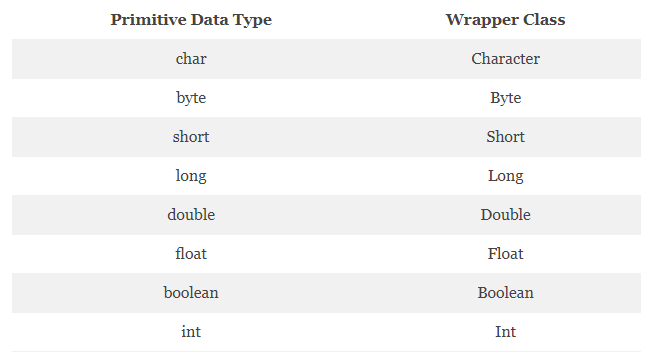
We all know Java is not a pure object oriented programming language, the main reason behind this is that it works on primitive data types. To use data types in the form of objects we use wrapper classes. Wrapper class in Java is mainly an object which makes the code fully object oriented. For example, int-Integer, char – Character, etc.

In this article, you will get to know how Autoboxing and Unboxing in Java work with an example. So, let start with the introduction.

1. What is the Wrapper Class in Java?

A Wrapper class in Java is the type of class which contains or the primitive data types. When a wrapper class is created a new field is created and in that field, we store the primitive data types. It also provides the mechanism to covert primitive into object and object into primitive.

Working with collections, we use generally generic ArrayList<Integer> instead of this ArrayList<int>. An integer is wrapper class of int primitive type. We use a Java wrapper class because for generics we need objects, not the primitives.

To get in-Depth knowledge on Java you can enroll for a live demo on Java Online Training

Advantages of Java Wrapper Class

  • They are used to convert the primitive data types into objects (Objects are needed when we need to pass an argument in the given method).
  • The package java.util contains classes which only handles objects, so it helps in this case too.
  • Data Structures store only objects and primitive data types.
  • In multithreading, we need an object to support synchronization.

2. Autoboxing and Unboxing in Java

2.1 Autoboxing in Java

Java Autoboxing is used to automatically convert the primitive data types into corresponding objects.

 package com.dataflair.wrapperclass;
import java.util.ArrayList;
public class Autoboxing 
{
  public static void main(String[] args)
  {
    char character = 'a';
    Character a = character;
    ArrayList<Integer> arrayList = new ArrayList<Integer>();
        arrayList.add(25);
    System.out.println(arrayList.get(0));
  }
}

Output

Autoboxing in java

Take your career to new heights of success with Core Java Training

2.1 Unboxing in Java

Java Unboxing is reverse of Autoboxing, i.e. it converts wrapper class object into its corresponding primitive data type.

package com.dataflair.wrapperclass;
import java.util.ArrayList;
public class Unboxing {
  public static void main(String[] args)
  {
    Character character = 'a';
    char a = character;
    ArrayList<Integer> arrayList = new ArrayList<Integer>();
    arrayList.add(25);
    int num = arrayList.get(0);
    System.out.println(num);
  }
}

Output

Unboxing in Java

3. How to Implement a Wrapper Class?

Let’s study the implementation with an example

package com.dataflair.wrapperclass;
public class ImplementingWrapperClass {
  public static void main(String args[])
  {
    //  byte data type
    byte byteVar = 1;
    // wrapping around Byte object
    Byte byteobj = new Byte(byteVar);
    // int data type
    int intVar = 10;
    //wrapping around Integer object
    Integer intobj = new Integer(intVar);
    // float data type
    float floatVar = 18.6f;
    // wrapping around Float object
    Float floatobj = new Float(floatVar);
    // double data type
    double dobleVar = 250.5;
    // Wrapping around Double object
    Double doubleobj = new Double(dobleVar);
    // char data type
    char charVar='a';
    // wrapping around Character object
    Character charobj=charVar;
    //  printing the values from objects
    System.out.println("Values of Wrapper objects (printing as objects)");
    System.out.println("Byte object byteobj:  " + byteobj);
    System.out.println("Integer object intobj:  " + intobj);
    System.out.println("Float object floatobj:  " + floatobj);
    System.out.println("Double object doubleobj:  " + doubleobj);
    System.out.println("Character object charobj:  " + charobj);
    // objects to data types (retrieving data types from objects)
    // unwrapping objects to primitive data types
    byte unwrappingByte = byteobj;
    int unwrappingInt = intobj;
    float unwrappingFloat = floatobj;
    double unwrappingDouble = doubleobj;
    char unwrappingChar = charobj;
    System.out.println("Unwrapped values ");
    System.out.println("byte value, unwrapped Byte: " + unwrappingByte);
    System.out.println("int value, unwrapped Int: " + unwrappingInt);
    System.out.println("float value, unwrapped Float: " + unwrappingFloat);
    System.out.println("double value, unwrappied Double: " + unwrappingDouble);
    System.out.println("char value, unwrapped Char: " + unwrappingChar);
  }
}

Output

Implementing-wrapper-class

To learn more about Online Java Compilers and other great features of Java, you can enroll for a live demo on Core Java Online Training

How is Maven useful in Java applications? Explain benefits of maven in Java

Java:

Java is an object oriented  programming language. It is built to have as few dependencies as possible on implementation. It is Write once, run anywhere (WORA) platform. The Compiled Java code will run on all Java-supporting platforms without recompilation.

What is maven in Java?

 Maven is a strong, POM-based project management tool (project object model). This is used for the design, maintenance, and documentation of projects. It simplifies the process of building as in ANT. But it is way too far advanced than ANT.

We can say in short terms that maven is a tool that can be used to create and manage any Java-based project. Maven supports the day-to-day work of Java developers. It generally helps to understand any Java-based project.

To get in-Depth knowledge on Java you can enroll for a live demo on Java Online Training

Maven repository:

Maven repositories are folders with some metadata on bundled JAR files. The metadata are POM files relating to the projects belonging to each packaged JAR object, including what external dependencies each packaged JAR has to provide. This metadata helps Maven to recursively download dependencies until all dependencies are downloaded.Then insertion to local machine takes place.

Maven has three repository types:

  • Local Repository
  • Central repository 
  • Remote Repository

Local repository:

A local repository is a directory on a developer’s computer. This repository includes all versions of the Maven dependencies. Maven would only need to download the dependencies once.  They rely on several projects (e.g. ODBC).

Central Repository: 

Maven Group is developed as the central Maven repository. Maven searches for any dependencies required in this central repository but can’t be found in your local repository. Maven then downloads to your local repository these dependencies. Via this link you can access the central repository.

Remote repository:

Remote repository is a repository on a web server from which Maven can access dependencies. These are also used to host internal projects. Maven then downloads to your local repository these dependencies.

https://media.geeksforgeeks.org/wp-content/uploads/Maven-Repository.jpg

Benefits of using Maven in Java:

Build tool:

This is a tool which automates the software project. The benefit of automating build projects is to minimize errors occurring during manual building. It creates a JAR, WAR and EAR file in the Java environment.  It is faster than a human in performing the task. It is faster because it has a lot of sensible default values.

Dependency management:

This is one of the main benefits of building a Java application is dependency management. Java depends on internal and external libraries with different versions. So it is evident to have an internal maven repository to archive all JAR files. 

Transitive dependency:

Maven also helps in managing transitive dependencies. If you are currently working on spring framework, you need not download all libraries of spring framework. Maven will download all the JAR files in supported versions. This eliminates errors like NoClassDefFoundError, UnnsupportedClassVersionError which arise due incorrect libraries.

Take your career to new heights of success with Core Java Training

Pom.xml:

Another important thing about Maven is pom.xml, it’s close to ANT development tool create.xml. You have their pom.xml for each project, which is the Project object model. This pom.xml includes descriptions of the project e.g. ArtifactId, GroupId, name, etc. It is used to create deliverables such as JAR file, these can be used to add JAR to the internal maven repository. Further Java HashSet example, the pom.xml also includes Maven Plugins used to build a JAR file from class files and resources in a project like JAR plug-in. Pom.xml also contains all the dependencies e.g. JAR files provided by your Java project, and their version.

Task V/S goals:

Maven projects can be developed and run either from the command line or from Eclipse. Maven has goals close to task. You can run those goals using the MVN command in the command line to invoke them.

You need to include maven binaries such as MAVEN HOME / bin in your PATH to create. Then run a Maven project from the command line. If you have installed the M2Eclipse plugin, you can conduct clean maven installations directly from Eclipse itself. Two commonly used maven targets are clean and mount.

Target directory:

When creating the project using Maven it creates resource class files and copies in the target directory. All your class files can be found inside the target / classes directory. This directory is cleaned when you run the maven clean command to compile your Java files again and build new class files.

On the other side, the command MVN install runs both Maven clean and create together. The maven clean will clean old build artifacts from the target directory, for example, class files.

Conclusion:

In this article I briefly discussed the use of the Maven tool in Java. It is still the most popular tool in Java. You can learn more about Java through Core java online training. I hope you understood the use of the maven tool in Java. Thank you for reading this article.

SETTING UP SOCKET.IO WITH NODE.JS CLUSTER

Node.js is getting more and more popular in development world, so are the WebSockets (real time connection), but still to make WebSockets and Node.js Cluster work well together using socket.io isn’t well documented and a taboo . However its not anymore.

In this article we will learn What websockets are, How Node.js cluster works, What problems we face while setting up WebSockets with Node.js cluster and  How we are going to solve them. Before getting into the article its assumed you have little knowledge on node.js and how it works.If you are a newbie don’t worry, we have still got you covered. Go through this blog Nodejs Online Training

What are WebSockets:

      “Websockets are an advanced technology that makes it possible to open an interactive communication session between the user’s browser and a server. With this API, you can send messages to a server and receive event-driven responses without having to poll the server for a reply.”

But why do we need webSockets we already have AJAX? WebSockets represent a standard for bi-directional realtime communication between servers and clients. Firstly in web browsers, but ultimately between any server and any client. The standards first approach means that as developers we can finally create functionality that works consistently across multiple platforms. Connection limitations are no longer a problem since WebSockets represent a single TCP socket connection. Cross domain communication has been considered from day one and is dealt with within the connection handshake.

Now as we know what WebSockets are lets dive into setting up a Node.js Cluster.

Node.js cluster API:

Node.Js processes runs on a single process,While it’s still very fast in most cases, this really doesn’t take advantage of multiple processors if they’re available. If you have an 8 core CPU and run a Node.Js program via

$ node app.js

it will run in a single process, wasting the rest of CPUs. Hopefully for us NodeJS offers the “cluster” module that allows you to create a small network of separate processes which can share server ports; this gives your Node.js app access to the full power of your server.

To get in-Depth knowledge on Nodejs you can enroll for a live demo on Nodejs Online Training Hyderabad

uhh! That’s enough of talking lets see a real example which:

  • Creates a master process that retrives the number of CPUs and forks a worker process for each CPU, and
  • Each child process prints a message in console and exit.
const http = require('http');
const cluster = require('cluster');
const numCPUs = require('os').cpus().length;
 
if (cluster.isMaster) {
  masterProcess();
} else {
  childProcess();  
}
 
function masterProcess() {
  console.log(`Master ${process.pid} is running`);
 
  for (let i = 0; i < numCPUs; i++) {
    console.log(`Forking process number ${i}...`);
    cluster.fork();
  }
 
  process.exit();
}
 
function childProcess() {
  console.log(`Worker ${process.pid} started and finished`);
 
  process.exit();
}

Save the code in

app.js

file and run executing:

	
$ node app.js

The output should be something similar to:

Master 8463 is running
Forking process number 0...
Forking process number 1...
Forking process number 2...
Forking process number 3...
Worker 8464 started and finished
Worker 8465 started and finished
Worker 8467 started and finished
Worker 8466 started and finished

simple isn’t it? Indeed it is.

Take your career to new heights of success with Nodejs Course

Making socket.io work with node.js cluster API:

So can we just start using web-sockets(with socket.io library) with node cluster API?  ummm not yet.The problem comes with how socket connections are established. Before going further lets understand basic steps in establishing a socket connection.

Handshake

When creating a WebSocket connection, the first step is a handshake over TCP in which the client and server agree to use the WebSocket Protocol.The handshake from the client looks like this:

GET /chat HTTP/1.1
Host: server.example.com
Upgrade: websocket
Connection: Upgrade
Sec-WebSocket-Key: dGhlIHNhbXBsZSBub25jZQ==
Origin: http://example.com
Sec-WebSocket-Protocol: chat, superchat
Sec-WebSocket-Version: 13

The handshake from the server:

HTTP/1.1 101 Switching Protocols
Upgrade: websocket
Connection: Upgrade
Sec-WebSocket-Accept: s3pPLMBiTxaQ9kYGzzhZRbK+xOo=
Sec-WebSocket-Protocol: chat

Create a WebSocket Connection

A WebSocket connection is established by upgrading from the HTTP protocol to the WebSocket Protocol during the initial handshake between the client and the server, “over the same underlying TCP connection“.

An Upgrade header is included in this request that informs the server that the client wishes to establish a WebSocket connection.Hence, If we plan to distribute the load of connections among different processes(i.e a cluster), we have to make sure that requests associated with a particular session id connect to the process that originated them.This is due to certain transports like XHR Polling or JSONP Polling relying on firing several requests during the lifetime of the “socket”.Failing to enable sticky balancing will result in the dreaded:

Error during WebSocket handshake: Unexpected response code: 400

Which means that the upgrade request was sent to a node(one among all the available cluster nodes) which did not know the given socket id, hence the HTTP 400 response.This can be solved with a simple trick, that is to ensure file descriptors (ie: connections) are routed based on the originating remoteAddress (requests from a particular address are routed to same node) rather than in a round-robin fashion.Lets do it


const workers = [];
 
const cluster = require('cluster');
const cpus = require('os').cpus().length;
const port = process.env.PORT || 3001;
const path = require('path');
const net = require('net');
const socketio = require('socket.io');
const farmhash = require('farmhash');
const net = require('net');
if(cluster.isMaster){
    console.log('Master started process id', process.pid);
 
    for(let i=0;i<cpus;i++){
        workers.push( cluster.fork());
        console.log('worker strated '+workers[i].id);
 
        workers[i].on('disconnect',() => {
            console.log('worker '+ workers[i].id+'died');
        });
    }
    // get worker index based on Ip and total no of workers so that it can be tranferred to same worker
    const getWorker_index = (ip,len) => {
        return farmhash.fingerprint32(ip)%len;
    }
 
    // ceating TCP server
    const server = net.createServer({
        // seting pauseOnCOnnect to true , so that when  we receive a connection pause it
        // and send to corresponding worker
        pauseOnConnect: true 
    }, (connection) => {
        // We received a connection and need to pass it to the appropriate
  // worker. Get the worker for this connection's source IP and pass
        // it the connection. we use above defined getworker_index func for that
        const worker = workers[getWorker_index(connection.remoteAddress,cpus)];
 
        // send the connection to the worker and send resume it there using .resume()
        worker.send({
            cmd:'sticky-session'
        },connection);
    }).listen(port);
}
 
else{
 
    // listning for message event sent by master to catch the connection and resume
    cluster.worker.on('message',(obj,data) => {
        switch(obj.cmd){
            case "sticky-session":
                Expserver.emit('connection',data);
                data.resume();
                break;
            default: return;
        }            
    });
}

As you can see requests originating from same IP address goes to same node in the cluster hence sticky balancing the requests.Please note that this might lead to unbalanced routing, depending on the hashing method we use.

There you go. This is how you make socket.io work with Node.js cluster API:)

Here’s the repo of sample chat application using Socket.io and node cluster API:
https://github.com/ANURAGVASI/socket.io-multiserver-chatAp

Why BizTalk Server For eCommerce Solutions?

eCommerce server is a web-software that accomplishes the main functions of an online shopping portal such as product display, online ordering, and inventory management etc. The software works in association with online payment systems to process all payments.

To begin with let’s understand BizTalk first. BizTalk is an industry initiative governed by Microsoft to promote Extensible Markup Language i.e. XML. It is the common data exchange language for e-commerce and application integration on the Internet.

BizTalk acknowledge that the development  of e-commerce requires businesses which are utilizing various  types of computer technologies to have modes to share the data. Favoring XML as a stage unbiased approach to speak to data transmitted between PCs, the BizTalk group has given some rules, referred to as the BizTalk Framework, for how to publish schema i.e. standard data structures in XML and how to use XML messages to integrate the software programs. Get more Info at Biztalk certification course

Key features in BizTalk Server are:

  • Better support for deploying, monitoring, and managing e-commerce applications
  • Significantly simpler installation
  • Improved capabilities for Business Activity Monitoring (BAM)

Why to opt for BizTalk Server?

The answer is simple, it makes complex problems easier to solve. BizTalk Server integrates two key features i.e. orchestration and messaging. While the powerful messaging engine handles message transport and mapping, BizTalk Orchestration Services can orchestrate business processes consist of components, and messages that are sent and received using the BizTalk Messaging Service.

It enables:

  • Dynamic business process
  • Integrates business partners and its applications
  • Provides interoperability using the public standards

It uses XML internally to define the data and structure of your business documents, and it uses standard Internet protocols like HTTP and Simple Mail Transfer Protocol (SMTP) to deliver these documents to their destinations, enabling you to inter operate with various applications running in any environment as long as those applications support Internet standards.

How it helps?

Problems faced by the organization generally:

  1. Disparate applications: It’s too difficult to integrate dissimilar applications within the company
  2. Dissimilar reports: There is no way to generate integrated, timely reports from the various applications because the data is stored in so many places.
  3. No set procedure: Company does not have any consistent method for implementing the critical business processes.
  4. Programming overruns: It takes too long to develop integrated solutions for the company’s enterprise resource plan.
  5. Modification difficulties: Once the internal applications are integrated, changing them is arduous and expensive.
  6. Partnering headaches: It’s too difficult to integrate the company’s business processes with the trading partners.
  7. Changing partners: If another business offers a better deal, it’s too difficult to take advantage of this with the entire IT infrastructure that is required.

However, business over the internet i.e. e-commerce are when integrated with these in-house applications can resolve these complex situations and reliability increases. BizTalk Server is designed to help you solve these problems. Using graphical tools like BizTalk Orchestration Designer and BizTalk Editor, BizTalk Server lets you design your unique business processes in a visual design environment. BizTalk Server then executes the visual diagram, providing rapid application development (RAD) for business processes.
BizTalk server simplifies the workload by producing simplified data which can be evaluated easily. To summarize the whole, BizTalk Server is a technology solution that improves efficiency and reinvents business ideas and strategies. It boosts the features of e-commerce independent of an operating system and programming language.


Design a site like this with WordPress.com
Get started